🎫 Support Tickets
The Support / Issues area lets you raise a request with the BiggerBlueButton team and track the conversation in one place.
➕ Create a ticket
Open a new ticket with:
- Title — a short summary of the issue.
- Message — the full description of what you need help with.
- Priority — choose low, normal, or high.
- Labels — optional tags to classify the ticket.
- Attachments — upload screenshots, logs, or documents to help explain the problem.
When you submit, the ticket is created and both you and the support team are notified by email.
A ticket can't be edited once submitted. Add anything you forgot as a follow-up message in the conversation.
💬 Follow the conversation
- Reply / post a message to continue the thread — staff and customer messages appear inline, in order.
- Attachments can be added to any reply.
- The sidebar shows the ticket's status, priority, requester, created date, and last interaction.
✅ Close a ticket
When your issue is resolved, click Close. The ticket is marked closed and you receive a confirmation email. You can filter your list by Open and Closed at any time.
📋 Your tickets list
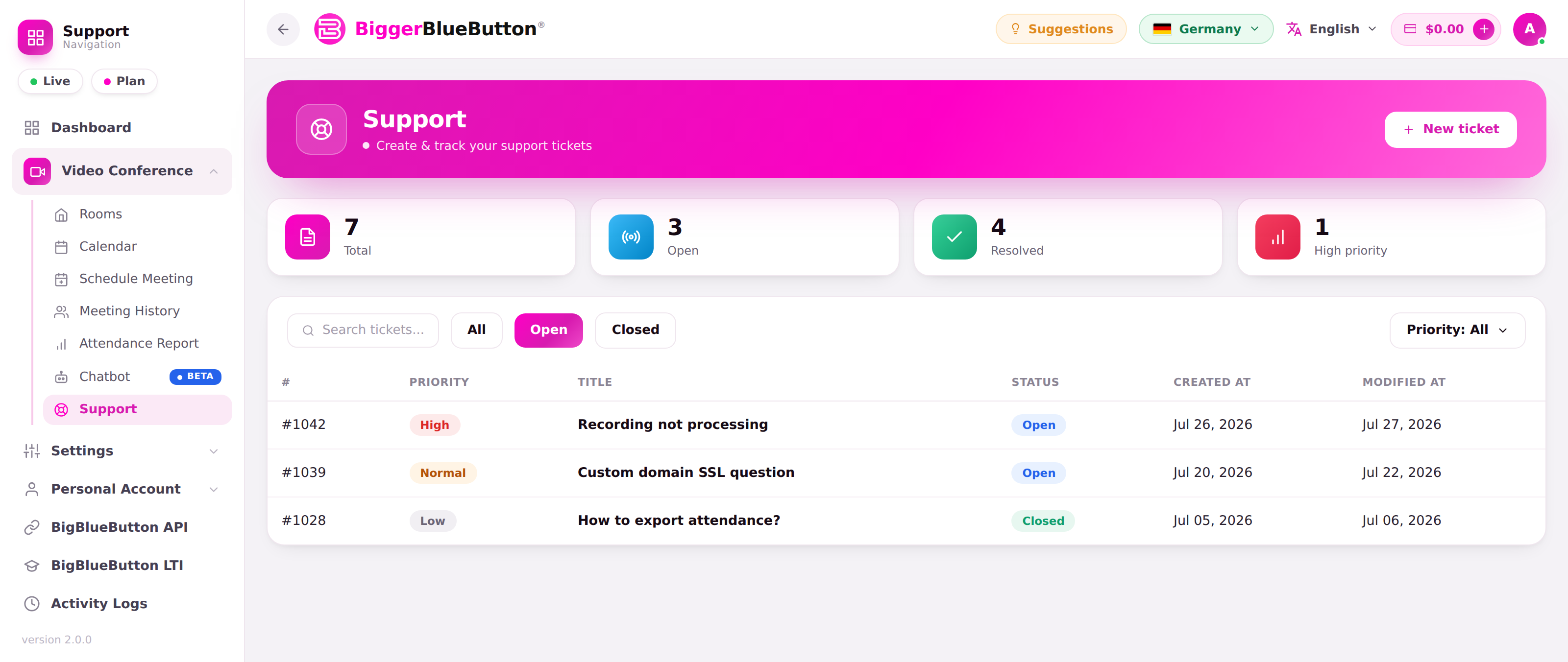
The list page gives you an at-a-glance overview with Total, Open, Resolved, and High priority counters, plus search, saved views (All / Open / Closed), and a priority filter. The table is sortable by id, priority, title, status, and dates.
🔒 Privacy
Tickets are scoped to your account — you can only open and view your own tickets. Attempting to open someone else's ticket is denied.
💡 Tips
- Set an honest priority — it helps support triage urgent problems first.
- Attach a screenshot or the exact error message to speed up resolution.
- Close tickets you've finished with, and post a follow-up message rather than opening a duplicate if the same issue comes back.